
Check Your Mercedes-Benz Paint Code by VIN
Use a Mercedes-Benz paint code by VIN lookup to check the vehicle’s original exterior color, paint code, finish, interior color, upholstery, and trim details. It gives you the factory color information you need before ordering paint, repairing bodywork, restoring a vehicle, or checking a used Mercedes-Benz.
Understanding Mercedes-Benz Paint Codes
A Mercedes-Benz paint code identifies the specific factory paint assigned to a vehicle. It is more useful than judging the color by eye because similar-looking shades can use different factory codes.
Using a Mercedes paint code lookup helps connect the VIN with the original exterior color record, so you have a clearer reference for paint repairs, restoration work, replacement parts, or vehicle verification.
If your paint code sticker is missing or worn out, you can use a Mercedes-Benz window sticker lookup to confirm your original factory color before you check the exact code.
What Will Your Mercedes-Benz Paint Code Lookup Display
A Mercedes-Benz paint code lookup provides more than just a single number. Here’s what your report may include.
Exterior Color Details
Factory Color Name
See the official Mercedes-Benz name given to your exterior color.
Exact Paint Code
Get the precise code used to mix your car's exterior paint.
Finish Type
Find out if your paint is solid, metallic, or a manufaktur finish.
Interior Color Details
Interior Trim Code
Find the code tied to your upholstery, dash trim, and door panels.
Material Type
Check whether your interior uses leather, MB-Tex, or fabric.
Color Family
See the general interior tone your car falls under, such as a dark palette (like Black) or a light palette (like Macchiato Beige).
How to Find Your Mercedes-Benz Paint Code by VIN?
Getting your paint code takes just three simple steps.
- 1
Enter Your Mercedes-Benz VIN
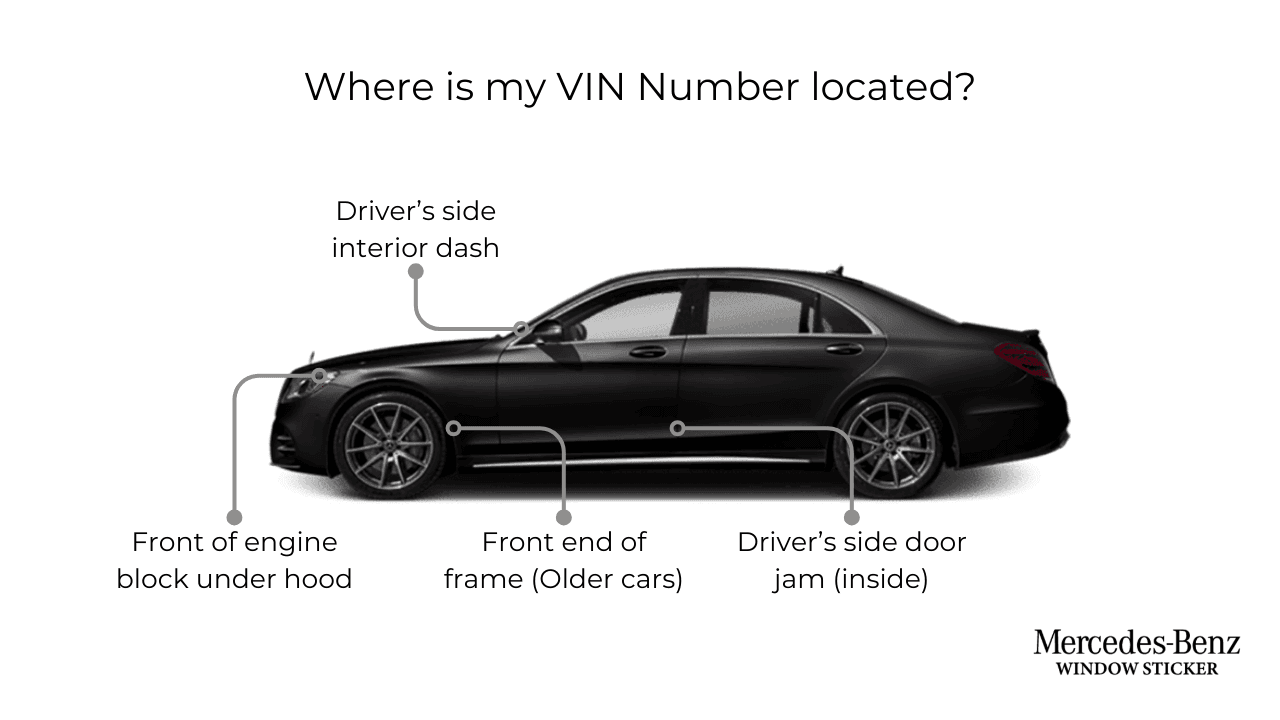
Locate your 17-digit Vehicle Identification Number. You can find it on your dashboard, driver door jamb, or vehicle registration card. Type it into our search box to start. - 2
Confirm Your Vehicle Details
After you enter your VIN, we will show your car's make, model, and model year. Take a moment to confirm everything is correct. - 3
View Your Factory Paint Code
After making the payment, you’ll see your exact Mercedes-Benz paint code within seconds, along with the color name and any related trim details from your build sheet.
Why Does Your Mercedes-Benz Paint Code Matter?
Knowing the Mercedes factory paint code gives you a better reference whenever exterior color accuracy matters.
✓ Order Touch-Up Paint
Use the factory code before selecting paint for stone chips, scratches, and other small repairs.
✓ Prepare Body Repairs
Give a body shop the original paint information before repairing or refinishing damaged panels.
✓ Restore Original Color
Check the factory color before restoring an older or modified Mercedes-Benz.
✓ Verify a Used Vehicle
Compare the original color record with the paint currently on the vehicle when inspecting a used car.
✓ Match Replacement Parts
Use factory color information when preparing bumpers, spoilers, mirrors, or other painted replacement pieces.
✓ Support Vehicle Documentation
Keep the original color and trim details with your records when selling, restoring, or documenting the vehicle.
Where to Find the Paint Code on Your Mercedes-Benz
You can also locate the physical paint code sticker on your vehicle at these locations:
Check the vehicle identification or data label around the driver-side door or door frame. Some Mercedes-Benz vehicles display useful factory identification information there.
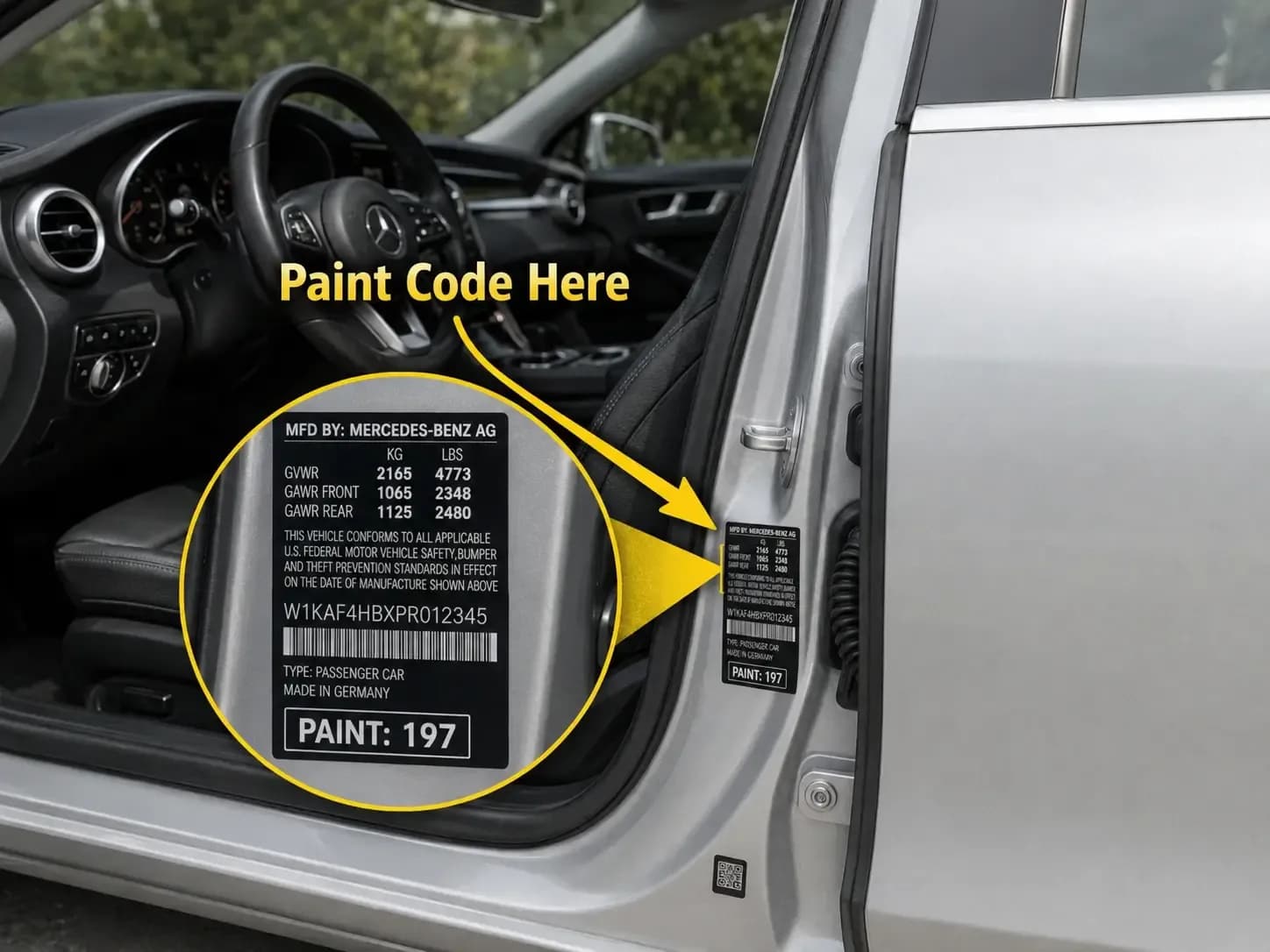
If the label is missing, faded, difficult to read, or you want to confirm the original factory record, use the VIN-based lookup instead.
Paint Code vs Color Name: What's the Difference?
Many Mercedes-Benz owners think a paint code and a color name are the same thing. They are not.
Item | Meaning | Example | Best Used For |
Color Name | The marketing name Mercedes-Benz gives the color | Obsidian Black Metallic | Sales listings, window stickers, brochures |
Paint Code | The factory code used to match the exact paint | 197 | Touch-up paint, full repaints, body shop work |
Color names can sound the same across different model years, but the actual paint code behind them may not match. This is why a VIN-based paint code lookup gives you a far more reliable result than relying on the color name alone.
Popular Mercedes-Benz Paint Colors and Codes
Mercedes-Benz uses hundreds of paint codes across its lineup. Codes can vary by model year, so always confirm your exact code using your VIN.
Here are a few well-known examples to give you an idea of what your result might look like.
Color Name | Paint Code | Common Models |
Obsidian Black Metallic | 197 | C-Class, E-Class, GLC |
Polar White | 149 | S-Class, GLE, A-Class |
Iridium Silver Metallic | 775 | C-Class, GLC, CLA |
Selenite Grey Metallic | 992 | GLE, GLS, E-Class |
Designo Cardinal Red Metallic | 996 | AMG models, S-Class |
Mercedes-Benz Models You Can Check
The Mercedes color code by VIN lookup supports many Mercedes-Benz cars, SUVs, performance models, electric vehicles, and vans, including:
| C-Class | E-Class | S-Class |
| CLA | CLE | GLA |
| GLB | GLC | GLE |
| GLS | G-Class (G-Wagen) | EQB |
| EQE | EQS | AMG GT |
| AMG SL | Sprinter |
← Scroll horizontally to see more →
Explore More Mercedes-Benz VIN Tools
Check Your Mercedes-Benz Factory Paint Code
Use the VIN to confirm the original exterior color, paint code, finish, interior color, upholstery, and trim before ordering paint or making a vehicle decision.
The Advantages You'll Get
Frequently Asked Questions
Most Mercedes-Benz paint codes are found on a sticker or metal plate inside the driver's door jamb. Open the driver's door and look at the frame where the door latches shut. Some models place the code under the hood near the radiator support or inside the trunk near the spare tire. If you cannot find it there, check the owner's manual as a backup.
Mercedes-Benz paint codes are usually made up of three numbers. For example, 775 stands for Iridium Silver. In some cases, you’ll see a C added before the code, which indicates clear coat protection.
On older models, especially those built before the 2000s, the codes often included a DB prefix. So you might see something like DB‑040 or DB‑723 instead of just the numbers.
Certain touch‑up paint databases may list longer four‑digit versions or supplier variations (such as 9197 or 7160), but the standard three‑digit code is the primary reference.
Your car’s VIN (Vehicle Identification Number) is linked to its factory build record, which includes the original paint color. By entering your VIN into the MercedesBenzWindowSticker.com paint code lookup tool, you can instantly access this record and see the exact paint code assigned to your vehicle.
Yes, all Mercedes-Benz vehicles include a paint code label applied during production. The position of the label varies depending on the model and year. If the sticker has been removed, damaged, or faded after repairs, the most reliable way to confirm the paint code is to use a VIN lookup.
Yes, any Mercedes-Benz dealer or service center can pull your paint code from your VIN using their internal system. This is a good backup option if your door sticker is missing, painted over, or too worn to read. Many auto parts stores can also do this lookup for you at no cost.
No. The code identifies the vehicle’s original factory finish. A used Mercedes-Benz may have been repainted, repaired, wrapped, or fitted with replacement panels after it was built.
The factory paint code is an important reference when selecting touch-up or repair paint. For larger or highly visible repairs, confirm the finish with the paint supplier or body shop before application.
Factory vehicle records can connect exterior color with interior color, upholstery, and trim. These details can help when restoring, verifying, or documenting the original configuration.